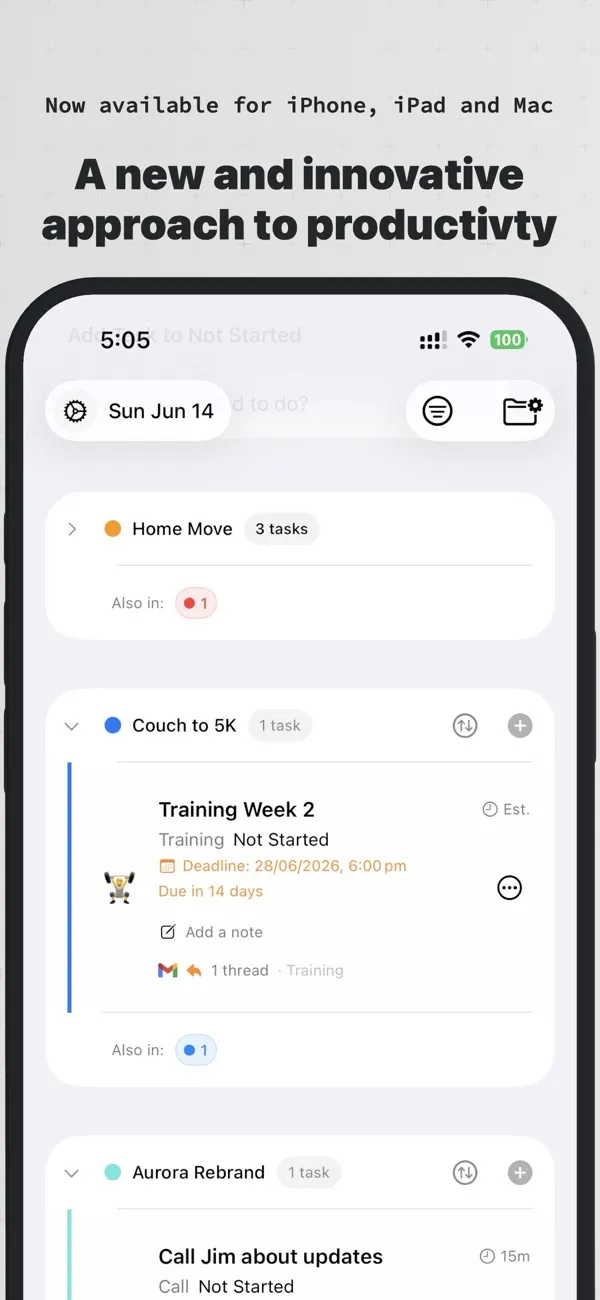
State-based task management
Nyblit sorts every task by what it actually is right now: Today, Blocked, Later or Done. No task sits in the wrong gear.

Four states, one mechanism
A task is never just done or not done. It moves through Today, Blocked, Later and Done as its real condition changes.
Waiting on a client reply or a colleague? Nyblit holds that task safely aside until it can move again.
Delay a task without deleting it or letting it clutter today's list. It resurfaces when its state changes.
Nyblit began as a FileMaker database over 20 years ago, built on the observation that most tasks can't be acted on right now.
A call to make, an email to send. It enters at Today, ready for action.
Leave a voicemail and the task moves to Blocked. It's waiting, not forgotten.
Not ready to act? Move it to Later. It stays out of your way until its time comes.
When the reply lands or the work finishes, the task clicks into Done. Logged, not lost.
A binary to-do list
With Nyblit
Well thought out with a truly minimalist design. The Progressive States feature is definitely the USP of this app and makes tracking tasks feel much more intuitive. I’m giving it 4 stars instead of 5 because notifications are currently not working, which is a core need for a productivity tool. Additionally, a great "nice-to-have" would be the ability to customize the icons for each state to allow for better personalization. Once the notification bug is squashed, this is easily a 5-star app!
RainyTales
In my work, tasks are never binary. As a PM, my list is usually a collection of items stuck in discovery, development, waiting for QA, or blocked by waiting for feedback or approval. Traditional apps treat these as 'Not Done,' which creates massive cognitive load and obscures what I can work on today or right now. Nyblit is the first tool that actually mirrors a real-world workflow. The ability to move a task to a 'Blocked' state, where it's hidden from my immediate 'In Progress' view but still tracked, is a game changer. I can set custom statuses like ‘Approval Pending' or 'UAT' that automatically categorizes the task's state. It also syncs across all of my devices, perfect when an idea strikes and I’m not in front of my laptop. If you're tired of 'Not Done' lists that don't reflect the reality of your work, you need this app.
I’ve been pleasantly surprised by Nyblit, and have found it superior to other to-do apps I’ve used. The developer is also a professional watchmaker, and it shows in the thoughtful design and attention to detail. Highly recommended, especially if you have ADHD or haven’t been satisfied with other task management apps. It’s also a bargain, with a reasonable one-time payment, and no subscription.
I’ve been pleasantly surprised by Nyblit, and have found it superior to other to-do apps I’ve used. The developer is also a professional watchmaker, and it shows in the thoughtful design and attention to detail. Highly recommended, especially if you have ADHD or haven’t been satisfied with other task management apps. It’s also a bargain, with a reasonable one-time payment, and no subscription.
From a Liquid Glass interface that’s genuinely one of the best-looking interfaces I have seen yet, to intuitive and seamless gestures that make creating and sorting tasks second nature, Nyblit makes the hassle of getting things done a thing of the past. One of the most impressive ways Nyblit helps you manage your tasks is through a fun-to-use Status Wheel that lets you easily switch between “Not Started”, “In Progress”, “Later”, “Blocked”, and “Done” tasks by simply holding on the three dots next to a task and dragging over to whichever Status Type you would like to give your task. It’s such a fun addition that you might even want to create tasks just to use it! There’s also plenty of other features, such as Category Types, where you can designate a Category for any one of your tasks, and you can even add Custom Status Types for these Custom Categories, such as a “Blocked” Custom Status labeled “Awaiting reply”, for when you’re waiting on a message back from someone. And to top off these amazing features, and the many more available in-app, Nyblit respects your privacy, so your tasks are only available to you. Nyblit truly is a well thought out, brilliantly executed, Task Management app that not only makes it a breeze to get things done, but also makes you actually want to get things done. Learn to Nyblit and you just might love to get things done! I am excited to see what you add and adjust in future updates! :)
I struggle with classical task managers. They’re either too over engineered or too restrictive. I spend more time fretting about how to use the tool than getting the work done, and end up feeling stuck. Nyblit strongly appeals to my slightly scattered, constantly evolving organization. Very strong start!
Great todo app, works with my personal issues :) and my personal workflows. Still ongoing development! Will keep using. Would pay for depending on cost. One suggestion: any way to change status to Done without having to create a new status for each category?
I’m very excited about this app! All the features seem like they would greatly help manage tasks and projects in my life! Thank you for making this app!
If your tasks can’t be neatly categorized into done and not done, this app is perfect. It’s well-built, smooth UI, well-integrated in the Apple ecosystem and an attentive developer interested in ensuring that the app is always of service to its users. No regrets here.
Hopefully more languages can be added
Today, Blocked, Later, Done. Each one in its place.